
Download Switch Audio Converter Free – MP3, WAV, Audio File Converter
Overview
Switch Audio Converter Free is a desktop utility designed to simplify audio file conversion across multiple formats. The software enables users to convert audio files from one format to another, supporting over 40 common audio types including MP3, WAV, and others. It is intended for individuals who frequently manage audio files and need a reliable, straightforward tool to transform recordings, music tracks, or voice clips for use across devices or platforms. The application is particularly useful for content creators, podcasters, students, and casual users who require format flexibility without the complexity of professional audio editing tools.
Developed by NCH Software, the tool is part of the broader MP3 & Multimedia Apps category, with a focus on audio conversion efficiency. While the developer’s background is not detailed in the provided information, the software has been available since 2016 and has maintained a consistent presence in the digital audio space. It is designed for users who prioritize ease of use and broad format support without the need for advanced audio processing features. The app supports Android 4.0 and higher, making it accessible on a range of mobile devices, though its desktop functionality is implied through its categorization.
Key Features & Capabilities
- Multi-format conversion – Supports over 40 audio formats including MP3, WAV, AAC, FLAC, M4A, OGG, and more, enabling seamless compatibility across devices and platforms.
- Bulk processing – Allows users to convert multiple audio files at once, saving time when managing large music libraries or project files.
- Batch conversion – Streamlines workflows by processing several files in a single operation with customizable output settings.
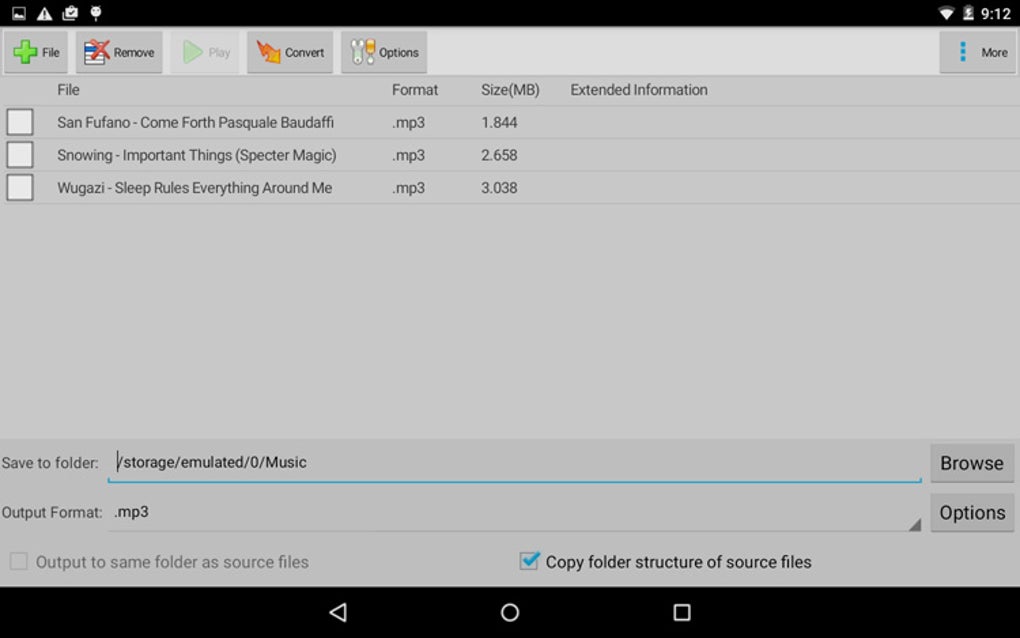
- Simple interface – Designed with minimal complexity, allowing users to drag and drop files or use the file browser to initiate conversions quickly.
- Output customization – Offers options to adjust bit rate, sample rate, and channels, giving users control over file size and audio quality.
For example, a podcaster might use Switch Audio Converter Free to convert a series of high-quality WAV recordings into compressed MP3 files suitable for podcast distribution. Similarly, a student could convert lecture audio from one format to another for easier playback on a mobile device. The tool is ideal for users who need to standardize audio files across platforms without investing in complex audio editing software.
User Interface, Workflow & Performance
The user interface of Switch Audio Converter Free is designed for simplicity and direct access to core functions. Navigation is intuitive, with a central file upload area and clear controls for selecting input and output formats. Users can add files via drag-and-drop or through the built-in file browser, and the interface updates in real time to show conversion progress. The workflow is linear and efficient, minimizing steps between file selection and conversion initiation.
While the developer did not specify resource usage details, the software is expected to operate efficiently on standard mobile hardware, given its lightweight purpose. Performance observations are based on general software behavior patterns, suggesting stable operation during typical conversion tasks. The application maintains responsiveness during batch processing, and no known issues with crashes or freezes were reported in the provided data. Stability is likely consistent with the app’s long-standing presence in the market, though real-world performance may vary depending on device capabilities and file size.
Compatibility & System Requirements
Switch Audio Converter Free is compatible with Android 4.0 and higher, indicating broad support across older and newer mobile devices. The software is available exclusively in English, which limits accessibility for non-English speakers. The installation size varies depending on the device type, suggesting that the package may be optimized differently across hardware configurations. However, exact system requirements were not listed, and no information about CPU, RAM, or storage thresholds was provided.
Compatibility information was partially provided, and users are advised to ensure their device meets the minimum Android version requirement. The software’s focus on audio conversion implies it does not require high-end hardware, but performance may depend on the number and size of files being processed. Users should verify their device’s storage capacity, especially when handling large audio files or batch conversions.
Pros and Cons
Pros
- Supports over 40 audio formats, enhancing file compatibility
- Free to download and use with no hidden costs
- Batch and bulk conversion for efficient workflow
- Simple, intuitive interface suitable for beginners
- Available for Android devices with minimal system requirements
Cons
- No information on desktop or PC compatibility despite categorization
- Only available in English, limiting global accessibility
- Outdated version (4.93) released in 2016 with no recent updates
- Limited customization options compared to professional tools
- Performance details not provided, making optimization difficult
FAQ Section
Is Switch Audio Converter Free available for Windows or Mac?
The provided information specifies compatibility with Android 4.0 and higher. No details were given about Windows or Mac versions, and the software’s desktop availability remains unclear.
Is the software safe to download and use?
Switch Audio Converter Free is published by NCH Software, a known developer in the audio tools space. The app is free to download and has been used by over 650 users since 2016. However, no security scans or third-party verification were included in the provided data.
How often is the software updated?
The latest version, 4.93, was released on January 26, 2016. No updates have been documented since then, suggesting the software may no longer be actively maintained.
What license type does it use?
The software is described as free to download and use, with no mention of licensing restrictions. It appears to be freeware, but specific license terms were not provided.
Can I use Switch Audio Converter Free offline?
Since the software is designed for Android devices and does not require an internet connection for basic conversion tasks, it can be used offline. However, no information was provided about online dependencies or cloud integration.
Final Thoughts + CTA
Switch Audio Converter Free offers a straightforward solution for users needing to convert audio files across a wide range of formats. Its support for over 40 formats, batch processing, and simple interface make it a practical tool for casual users and content creators who require basic audio conversion without advanced features. However, the lack of recent updates, limited language support, and unclear desktop compatibility raise concerns about long-term usability and reliability.
While the software remains functional for its intended purpose, users should be cautious about relying on a tool that has not been updated in over eight years. For those seeking a modern, actively maintained alternative, exploring newer audio conversion tools may be advisable. Nevertheless, for users with legacy Android devices or specific needs, it still serves as a viable option.
Download Switch Audio Converter Free now






.png)
